
Thread-Based Engineering: Scale Claude Code Sessions
Master the 6 thread types: P-threads, L-threads, B-threads, and more. The complete framework for running parallel Claude Code sessions at scale.
Agentic Orchestration Kit for Claude Code.
How do you know you're improving as an AI-assisted engineer?
Not just "feeling more productive." Actually measuring it. Quantifying it. Knowing for certain that you're getting more done than last week.
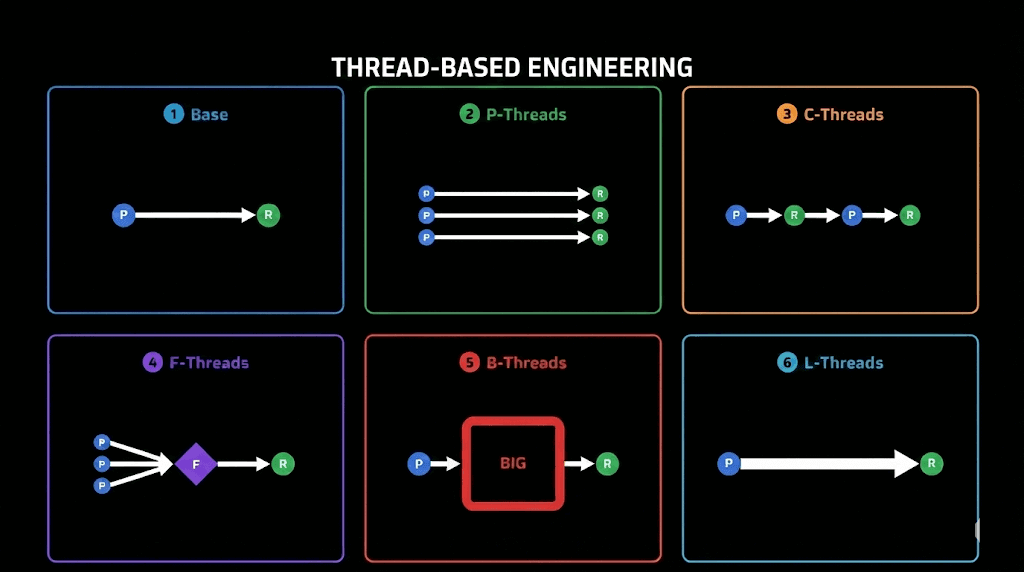
Thread-based engineering gives you that framework. It's a mental model for thinking about all your AI-assisted work as discrete units called threads. And once you see your work as threads, you can optimize them.
What Is a Thread?
A thread is a unit of engineering work over time driven by you and your agent.
Every thread has two mandatory nodes where you show up:
- The beginning: You prompt or plan
- The end: You review or validate
In between? Your agent does the work through tool calls.
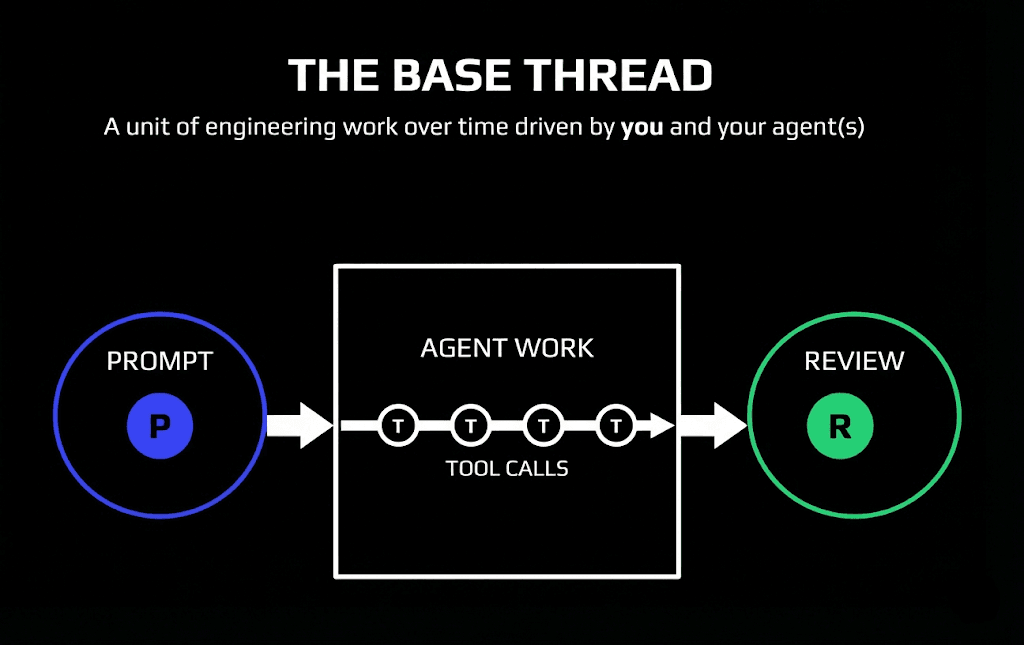
This is the base thread. Every time you fire up Claude Code and run a prompt, you're starting a thread. The agent executes tool calls (reads files, writes code, runs commands), and when it finishes, you review the result.
Simple concept. Powerful implications.
Why Tool Calls Matter
Here's the key insight: tool calls roughly equal impact (assuming you're prompting something useful).
Before 2023, you were the tool calls. You updated code. You read files. You ran commands. You did all of it.
Now you show up at the beginning (prompt) and end (review). Everything in between is automated.
The engineer running more useful tool calls is outperforming the engineer running fewer. That's the game now.
The Six Thread Types
Once you understand the base thread, you can scale it. There are six fundamental thread patterns that cover nearly every AI-assisted workflow.
1. Base Thread
The foundation. One prompt, agent work, one review.
Every other thread type builds on this. If you can't run a reliable base thread, you can't scale to anything else.
Use for: Simple tasks, quick fixes, single-file changes.
2. P-Threads (Parallel Execution)
Multiple threads of work running simultaneously.
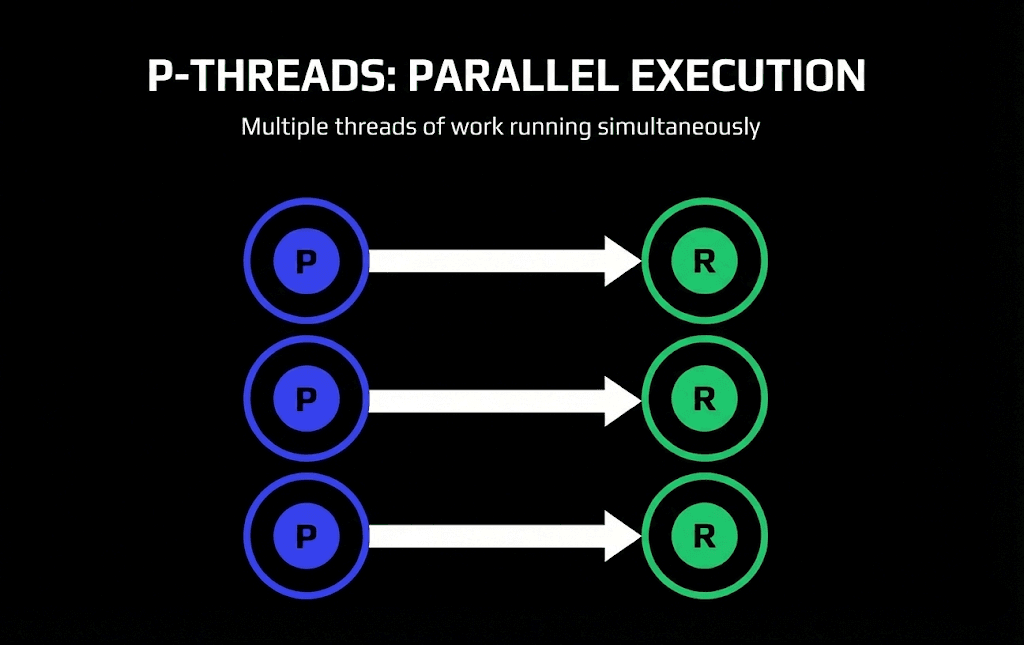
Boris Cherny, the creator of Claude Code, runs five Claude Code instances in his terminal. He numbers his tabs 1-5. On top of that, he runs 5-10 additional instances in the Claude Code web interface.
That's 10-15 parallel threads. While one agent works on authentication, another handles API endpoints, another writes tests. You prompt, switch tabs, prompt again, switch tabs, prompt again. Then come back and review results.
Use for: Independent tasks, code reviews, feature branches, research.
How to improve: Add more terminal windows. Use the Claude Code web interface for background agents. Fork terminals with custom tooling.
3. C-Threads (Chained Workloads)
Multi-phase work with human checkpoints between phases.
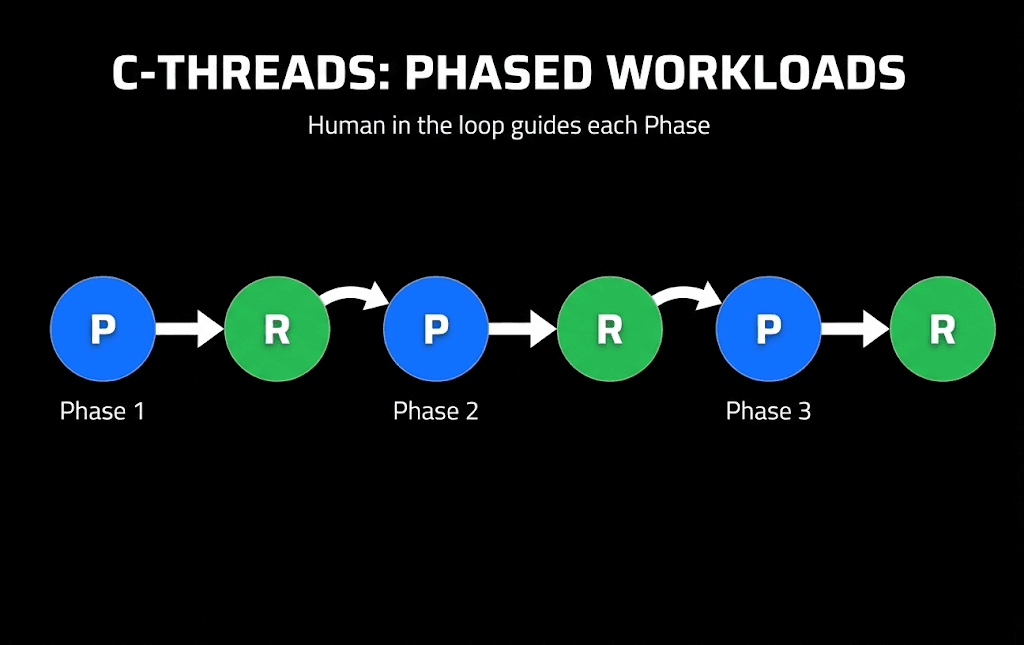
Sometimes work can't fit in a single context window. Or you're doing high-pressure production work and want to verify each step before continuing.
C-threads let you chunk work into phases:
- Phase 1: Database migration
- Phase 2: API updates
- Phase 3: Frontend changes
You review after each phase. If something's wrong, you catch it early instead of unwinding a massive change.
Use for: Production deployments, large refactors, sensitive migrations, multi-step workflows.
Trade-off: Your time. C-threads require more human attention. Use them when the risk justifies it.
Claude Code's ask user question tool supports C-threads naturally. Your agent can stop mid-workflow and request input before continuing to the next phase.
4. F-Threads (Fusion)
Same prompt to multiple agents, then aggregate the best results.
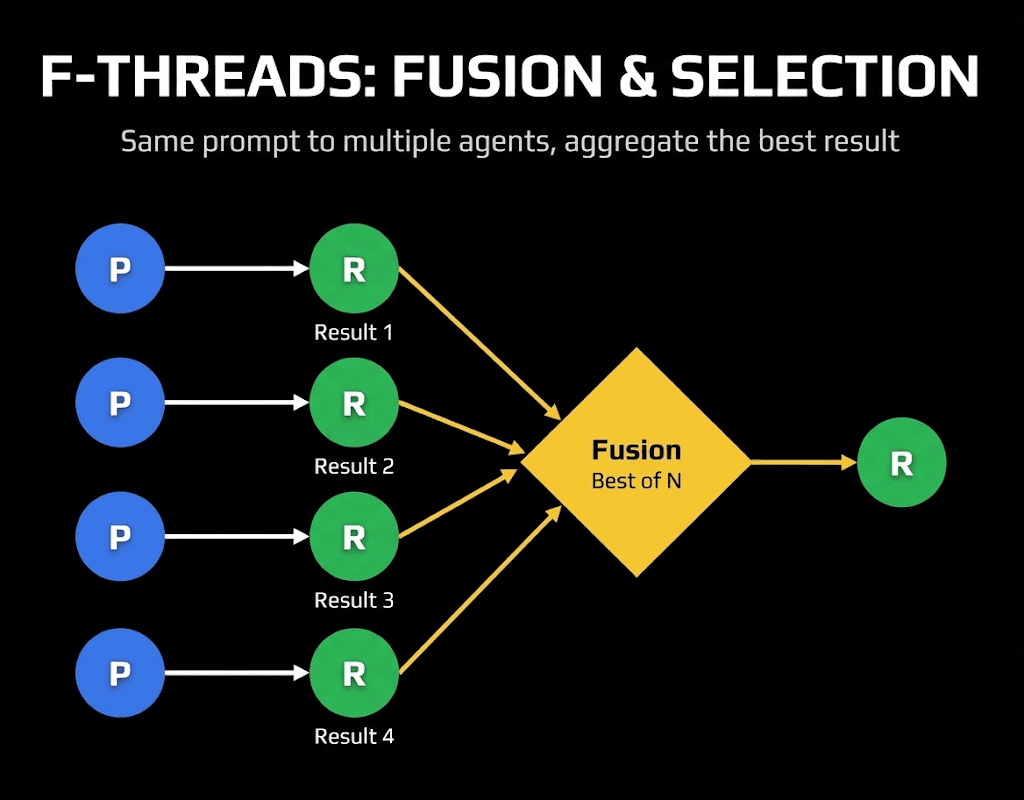
This is the "best of N" pattern applied to entire workflows. Send the same prompt to four agents. Review all four results. Pick the best one. Or cherry-pick ideas from multiple results to create something superior.
Why this works: More agents trying means higher chance of success. If one agent struggles, another might nail it. Four perspectives beat one.
Use for: Rapid prototyping, research questions, architecture decisions, code reviews where confidence matters.
The future of prototyping: F-threads will dominate rapid prototyping. Spin up multiple agents, let them all attempt the same problem, fuse the results. More compute equals more confidence.
5. B-Threads (Big/Meta)
One thread that contains other threads inside it.
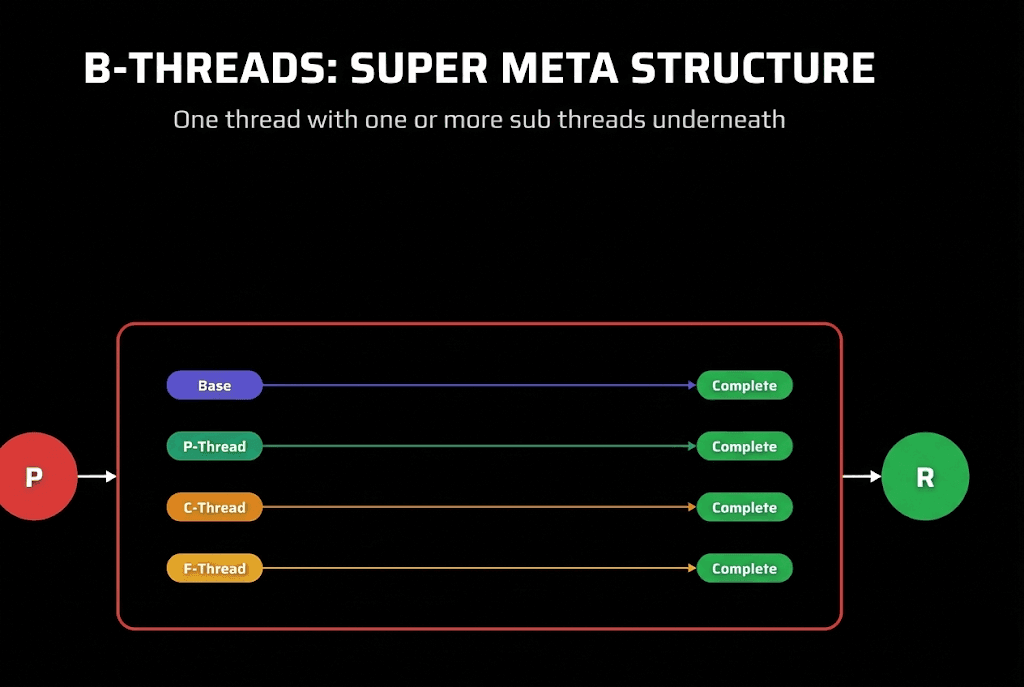
This is where things get meta. Your prompts fire off other prompts. Sub-agents spawn more sub-agents. An orchestrator agent kicks off a planning agent, then a building agent, then a review agent.
From your perspective as the engineer, you still just prompt at the beginning and review at the end. But underneath, multiple threads execute automatically.
The clearest example: Sub-agents. When you tell Claude Code to "use sub-agents to handle these three tasks," it spawns three separate threads internally. You prompted once, but three threads ran. ClaudeFast's Code Kit formalizes B-threads with its /team-build command -- an orchestrator spawns specialized agents (frontend, backend, quality engineer) from a single plan file, each running in isolated context.
Use for: Complex multi-file changes, team-of-agents workflows, orchestrated builds.
The pattern: Agent writes prompts for you. The orchestrator agent writes prompts for worker agents. You've 10x'd your throughput without 10x'ing your effort.
6. L-Threads (Long Duration)
Extended autonomy without human intervention.
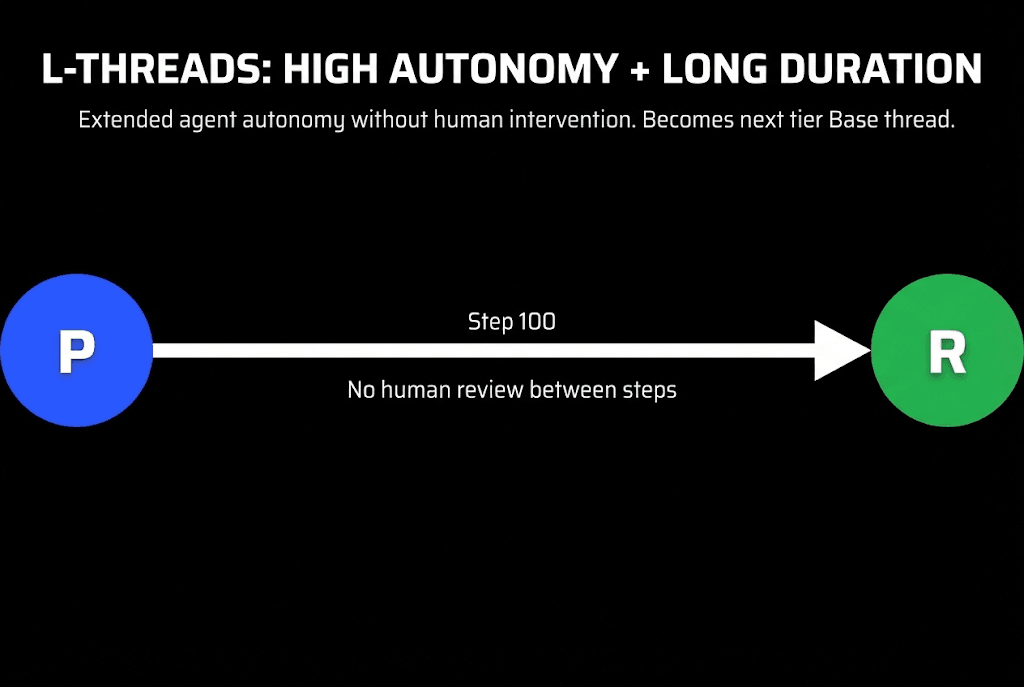
This is the base thread stretched to its limit. Instead of 10 tool calls, you're running 100. Instead of 5 minutes, you're running 5 hours. Boris has run threads for over 26 hours.
L-threads require:
- Excellent prompts (great planning = great prompting)
- Robust verification (so the agent knows when it's done)
- Checkpoint state (so work survives context limits)
The connection to Ralph: The Ralph Wiggum technique is built for L-threads. The stop hook keeps the agent iterating until work is genuinely complete. No premature exits. No human babysitting.
Use for: Overnight feature builds, large codebases, backlog clearing.
The Hidden Seventh Thread: Z-Threads
There's one more thread type that represents the future of engineering.
Z-threads: Zero-touch threads. Maximum trust with your agents. No review node at all.
This isn't vibe coding. This is advanced agentic engineering where you've built so much verification, so many guardrails, that you genuinely don't need to review the output.
The agent ships to production. Observes analytics. Decides if the change worked. Iterates.
Most engineers aren't ready for Z-threads. But that's the direction everything is heading. The goal: build systems you trust enough that review becomes optional.
Workflow Patterns: The Orchestration Layer
B-threads and L-threads describe the shape of your work: threads inside threads, threads that run for hours. But they don't tell you how to organize the agents inside that shape. That's the orchestration layer, and it lives beneath every B-thread and L-thread you run.
This is where dynamic workflows come in. A dynamic workflow is a small JavaScript harness Claude writes on the fly to spawn separate agents, each with its own clean context window and one focused goal. You trigger one by asking Claude to "make a workflow," or by switching on ultracode, which auto-triggers a workflow for substantive tasks. The harness is what turns a vague "use sub-agents" into a structured B-thread with named roles, barriers, and stop conditions.
There are six patterns that cover nearly every workflow. Each one maps cleanly onto a thread concept you already know.
Classify-and-act. A classifier agent reads the task, decides its type, then routes to the right downstream agent or behavior. This is a B-thread that opens with a routing decision. The orchestrator's first sub-thread does triage, and its verdict shapes every thread that follows. Use it when one prompt has to handle many task types: classify each incoming item, then act on it differently based on the class.
Fan-out-and-synthesize. Split a task into many small steps, run one agent on each, then merge the results. This is structured P-threading with a synthesize barrier on the end. The fan-out is the parallel part (many threads, each with a clean context so they don't cross-contaminate). The synthesize step is the barrier: it waits for every fan-out agent to finish, then fuses their structured outputs into one result. Use it when you have many small independent steps, or when each step benefits from its own uncontaminated context.
Adversarial verification. For each worker agent you spawn, run a separate agent whose only job is to attack the worker's output against a rubric. This is a verifier thread paired to every worker thread, and it directly fixes self-preferential bias: the agent that did the work never gets to grade its own homework. A fresh skeptic does. Spawn the worker, spawn the critic, keep only what survives.
Generate-and-filter. Generate many candidates, then filter them by a rubric or by verification, dedupe the duplicates, and return only the highest-quality survivors. This is F-threads with a quality gate. Where plain fusion picks the best of N, generate-and-filter produces N, tests each one, and keeps every candidate that clears the bar. Use it for ideation, naming, or any task where you want quantity first and quality second.
Tournament. Instead of dividing the work, agents compete on it. Spawn N agents that each attempt the same task with a different approach, then have a judge compare them pairwise until one winner emerges. This is F-threads judged head-to-head. Comparative judgment ("is A better than B?") is far more reliable than absolute scoring ("rate A from 1 to 10"), so the tournament structure produces a more trustworthy winner than fusion-by-vibes. Use it for sorting, ranking, design exploration, or anywhere a single best answer has to win.
Loop-until-done. For tasks with an unknown amount of work, keep spawning agents until a stop condition is met rather than running a fixed number of passes. This is the L-thread stop hook generalized to a convergence condition. The stop hook asks "is the task actually complete?" A loop-until-done workflow asks the same question with a measurable test: no new findings in the last K rounds, or zero errors left in the logs. Stop when the work is genuinely exhausted, not when a counter runs out.
You can compose these. A migration might fan out one agent per fix, pair each with an adversarial reviewer, and loop until the build is clean. That's a B-thread (threads inside threads) running as an L-thread (until done), orchestrated by three patterns at once.
The honest caveat: workflows spend significantly more tokens than a single thread. Before reaching for one, ask whether the task genuinely needs more compute. Most everyday coding does not need a panel of five reviewers. For the full mechanics, the six patterns with worked examples, and the harness API, read the dynamic workflows guide.
The Core Four
Everything in thread-based engineering connects back to four fundamentals:
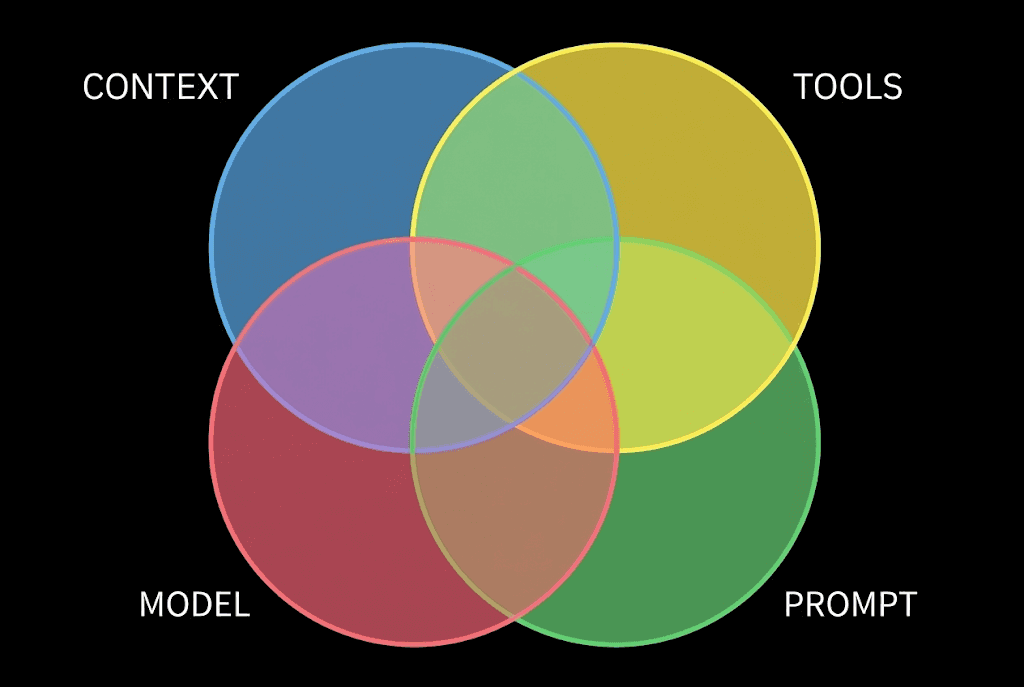
- Context: What your agent knows
- Model: Which model you're using
- Prompt: What you're asking
- Tools: What your agent can do
If you understand these four elements, you understand agents. Every thread optimization ultimately improves one of these.
- Better prompts = longer threads
- Better context = more accurate work
- Better tools = more capabilities
- Better models = higher reliability
The Stop Hook Pattern
For L-threads especially, the stop hook is critical.
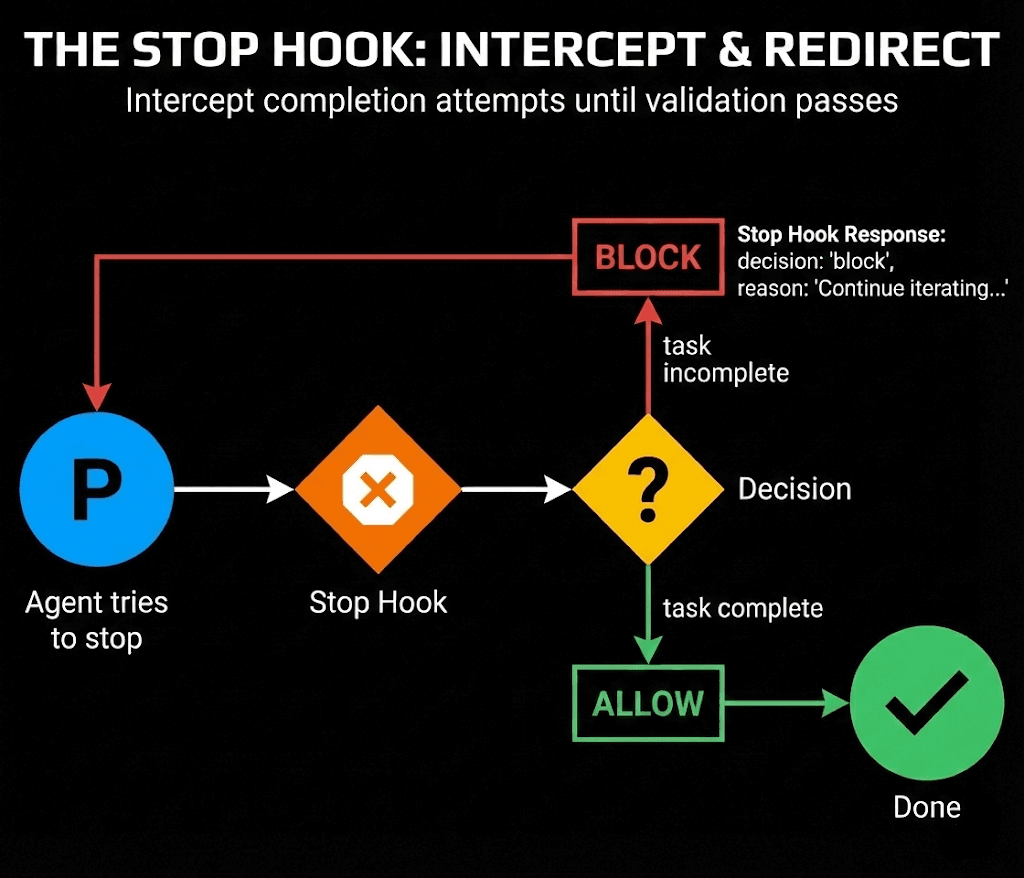
When your agent tries to stop, the stop hook intercepts:
- Agent tries to complete
- Stop hook runs validation code
- Decision: Is the task actually complete?
- If no: Block the stop, continue iterating
- If yes: Allow completion
This is the technical foundation of Ralph loops. The stop hook ensures your agent doesn't quit when it thinks it's done. It quits when the work is verified.
Four Ways to Improve
Thread-based engineering gives you a concrete framework for measuring improvement.
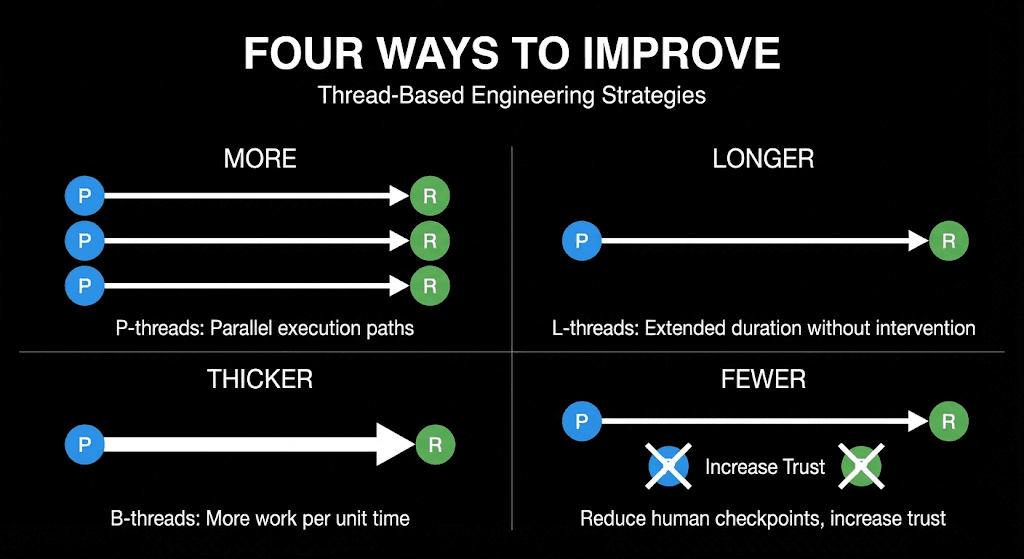
1. Run More Threads (P-Threads)
Can you spin up more parallel agents? Boris runs 10-15. Can you run 5? Can you run 3?
Measure: How many concurrent threads are you running?
2. Run Longer Threads (L-Threads)
Can your threads run for more tool calls without human intervention?
Measure: Average tool calls per thread before you need to intervene.
3. Run Thicker Threads (B-Threads)
Can you nest threads inside threads? Can one prompt kick off five sub-agents?
Measure: How much work happens per single prompt you write?
4. Run Fewer Checkpoints
Can you reduce human-in-the-loop reviews? Can you trust your verification enough to skip review?
Measure: How many phases can you run before needing to manually check?
If you're improving at any of these four dimensions, you're improving as an agentic engineer. That's the metric. That's how you know.
Practical Application
Here's how thread-based engineering looks in practice:
Monday morning: You have five features to build.
Old approach: Work on feature 1. Finish. Work on feature 2. Finish. Repeat. Five sequential sessions.
Thread-based approach:
- Write specs for all five features (planning phase)
- Spin up five parallel Claude Code instances (P-threads)
- Assign each instance a feature
- Let them run while you review the first completed results
- Some features need chunked phases (C-threads)
- For the complex one, spawn sub-agents (B-thread)
- The overnight task runs as an L-thread with Ralph loop
Same five features. But now you're running more threads, thicker threads, and longer threads.
Connecting to Ralph Wiggum
Thread-based engineering and Ralph loops are complementary frameworks.
Ralph answers: How do I keep an agent running reliably until work is done?
Thread-based engineering answers: How do I scale my agent usage and measure improvement?
Ralph gives you L-threads. Thread-based engineering tells you when to use L-threads versus P-threads versus B-threads.
The stop hook that powers Ralph is the same stop hook that enables long-running L-threads. Verification-first development makes both work.
The Mindset Shift
The engineers who are pulling ahead aren't just "using AI." They're thinking in threads.
Every task becomes: What type of thread is this? Can I parallelize it? Can I chain it? Can I nest sub-threads inside?
The constraint shifts from "how fast can I code?" to "how many useful threads can I run?"
Scale your compute. Scale your impact.
Getting Started
Start simple:
-
Audit your current work: How many threads do you typically run? (Most engineers: 1)
-
Add one P-thread: Open a second terminal. Run a parallel task while your first agent works.
-
Time your threads: How many tool calls before you intervene? Track this.
-
Try a C-thread: Break a large task into explicit phases. Review between phases.
-
Build toward L-threads: Set up verification. Try letting an agent run for 30 minutes unattended.
The goal isn't to immediately run 15 parallel Z-threads. The goal is continuous improvement. More threads. Longer threads. Thicker threads. Fewer checkpoints.
That's how you know you're improving. Not feeling. Measuring.
Next Steps
- Implement Ralph Wiggum loops for L-thread autonomy
- Learn async workflows for managing parallel agents
- Explore sub-agent design for B-thread architectures
- Master feedback loops for verification patterns
Thread-based engineering transforms AI coding from an art into a science. You can measure it. You can improve it. You can scale it.
Start counting your threads.
Last updated on