
Dynamic Workflows in Claude Code: How the Harness Actually Works
Why dynamic workflows exist, the three failure modes they fix, the six patterns, and how the harness runs. Beginner-friendly.
Agentic Orchestration Kit for Claude Code.
Ask Claude Code to run a security review across fifty files, and something frustrating happens. It checks the first thirty-five, builds up context, then declares the job done. The other fifteen files never got looked at. You only find out later, when a bug ships from a file Claude swore it had reviewed.
That is not a model that is bad at security review. It is a single context window hitting its limits. Dynamic Workflows in Claude Code fix this by letting Claude write its own orchestration program on the fly, then run that program across many separate Claudes, each with a clean context window and one focused job. This guide explains why workflows exist from first principles, the three failure modes they solve, the six reusable patterns, and exactly how the harness runs underneath. It ships alongside the Claude Opus 4.8 release, and it is the work of Thariq Shihipar and Sid Bidasaria on the Claude Code team.
Before we go further, two definitions. A harness is the program that wraps the model: it decides what Claude reads, when it acts, and how its output gets checked. A workflow is a harness that Claude writes itself, in real time, tailored to your specific task. The default Claude Code experience is one fixed harness built for coding. A dynamic workflow swaps in a custom one.
The Three Failure Modes a Single Context Window Hits
Most tasks look enough like coding that Claude Code's default harness handles them well. The trouble starts when a task runs long, fans out wide, or asks Claude to judge its own work. Three specific failure modes show up, and every dynamic workflow is built to defeat at least one of them.
Agentic laziness. On a complex, multi-part task, Claude stops before finishing and declares the job done after partial progress. The security review that covers thirty-five of fifty items is the canonical example. The model is not lying to you. It has filled its working memory, lost track of how much was left, and rationalized a stopping point.
Self-preferential bias. When you ask Claude to verify or judge its own results against a rubric, it tends to prefer its own findings. A grader that wrote the answer is a biased grader. This is the same reason you do not let a student mark their own exam. The instinct to defend prior work is baked in, and it gets worse when the verification happens inside the same conversation that produced the work.
Goal drift. Across many turns, fidelity to the original objective gradually erodes. The main culprit is compaction, the lossy summarization that happens when a conversation gets too long to fit in context. Each summarization step drops detail. Edge-case requirements and "don't do X" constraints are exactly the kind of fine print that gets compressed away, so by turn forty Claude is solving a slightly different problem than the one you asked for.
The common thread: all three get worse the longer a single context window runs and the more jobs you pile into it. The fix follows directly from the diagnosis.
The Fix: Separate Claudes With Isolated Goals
Instead of one Claude carrying everything, orchestrate many Claudes, each with its own fresh context window and a single focused goal. This is not a tweak. It structurally removes the conditions that cause each failure mode.
Isolation defeats agentic laziness because no individual agent holds the whole fifty-item task. One agent reviews one file. It cannot get tired of a list it never saw. The orchestrator tracks coverage, so nothing silently falls off the end.
Isolation defeats self-preferential bias because the agent that produces a result is never the agent that judges it. A separate verifier, in a separate context window, has no prior work to defend. Give it the rubric and the output, nothing else, and it grades on the merits.
Isolation defeats goal drift because each agent's window is short. It starts with a crisp goal, does one job, and returns before compaction ever kicks in. The original objective lives in the orchestrator's instructions to each agent, restated fresh every time, not buried under forty turns of summarization.
That is the entire thesis. The patterns later in this guide are just different shapes of "spread the work across isolated agents and check the results before they reach you."
How a Harness Actually Runs
Here is the part most explainers skip. A dynamic workflow is not a magic mode. It is a real JavaScript file that Claude writes on the spot, then executes. Understanding the file makes the whole feature concrete, so let's walk through the pieces.
Every workflow file starts with a metadata declaration, a plain literal with no variables or function calls:
The body uses a small set of building blocks. The three that matter most:
agent(prompt, opts) spawns one subagent. It returns that agent's final text, or a validated object if you pass a schema. This is the unit of isolated work, one Claude, one clean context window, one goal.
pipeline(items, stage1, stage2, ...) runs each item through every stage independently, with no barrier between stages. Item A can be in stage three while item B is still in stage one. This is the default for multi-stage work, and it is the right default because most stages do not need to wait on the whole batch. A file's verification can start the moment that file's review finishes.
parallel(thunks) runs a set of tasks at once and waits for all of them to complete before moving on. That waiting is the key property: parallel is a barrier. You reach for it only when the next step genuinely needs every prior result at once, for example deduplicating across the full set or comparing items against each other.
A few more pieces fill out the surface. You can hand agent() a structured-output schema (a JSON Schema), which forces the subagent to return a validated object and retries if it does not match, so downstream stages get clean data instead of prose to parse. A token budget caps how much the whole run can spend, which matters because workflows are not cheap. And isolation: 'worktree' gives an agent its own copy of the repository, which you want when several agents edit files in parallel and must not clobber each other. Concurrency is capped automatically, and there is a hard ceiling on how many agents a single run can spawn, so a workflow cannot quietly fork-bomb your machine.
The mental model: Claude writes a short program that says "for each of these items, do this then this, and here is where everyone waits for everyone else." Then it runs the program. That is a workflow.
Dynamic vs Static Workflows
You could always build a harness by hand. The Claude Agent SDK and claude -p let you script multi-agent flows today. The catch is that a hand-built, static harness has to handle every edge case for every task, so it ends up generic. You write one orchestration and hope it fits whatever comes next.
A dynamic workflow is the opposite. Because Opus 4.8 is intelligent enough to write a correct harness on demand, Claude builds one tailored to the exact task in front of it. A migration touching three modules gets a three-module harness. A fact-check of one blog post gets a claim-by-claim verification harness. Nothing generic, no edge cases to pre-solve, because the harness only has to handle the one task it was written for.
Triggering is simple. Ask Claude to "make a workflow," or turn on the ultracode effort setting, which sends xhigh effort to the model and lets Claude decide on its own when a task warrants a custom harness. Pair either with Auto Mode so a run that spawns dozens of subagents does not stop on every permission prompt.
The Six Patterns
Six composable patterns cover nearly every workflow you will want. Each is a different arrangement of "spawn isolated agents, then combine their work." Learn these names, because prompting Claude with the right pattern by name gives the sharpest results.

Classify-and-act. A classifier agent looks at the task and decides what kind it is, then routes to different agents or behaviors. A support-triage workflow might classify each ticket as bug, billing, or feature request, then hand each class to a specialist agent. The classifier can also run at the end, deciding how to label or package the final output.
Fan-out-and-synthesize. Split a task into many small steps, run one agent on each, then synthesize the results. The synthesize step is a barrier: it waits for all the fan-out agents to finish, then merges their structured outputs into a single result. This shines when there are many small independent steps, or when each step benefits from its own clean window so the steps do not cross-contaminate each other's context. A codebase audit fans out one agent per module, then synthesizes one report.
Adversarial verification. For each agent that produces a finding, spawn a separate agent whose only job is to refute it against a rubric or criteria. The producer and the skeptic never share a context window, which is exactly what kills self-preferential bias. A finding survives only if the skeptic cannot knock it down. This is the difference between "Claude says there is a race condition" and "Claude found a race condition that a dedicated refuter tried and failed to disprove."
Generate-and-filter. Generate many candidate ideas, then filter them by a rubric or by verification, deduplicate the near-identical ones, and return only the highest-quality, tested survivors. Naming a new feature, brainstorming attack vectors, or proposing refactors all fit: cast a wide net, then let a separate filtering pass keep only what holds up. The generation step is allowed to be noisy because the filter is doing the quality control.
Tournament. Instead of dividing the work, agents compete on the same task. Spawn N agents that each attempt it with a different approach, then a judging agent compares the results pairwise until a winner emerges. Pairwise comparison matters: asking "is A better than B?" is far more reliable than asking each agent to score itself from one to ten, because absolute scoring drifts and comparative judgment does not. Use this when there is no single correct answer and you want the best of several attempts.
Loop-until-done. When you do not know how much work there is, do not guess a fixed number of passes. Loop, spawning agents until a stop condition is met: no new findings two rounds in a row, or no more errors in the logs. A bug hunt with an unknown number of bugs keeps going until a round comes back empty, then stops. This is the honest pattern for open-ended discovery, because the work decides when it is finished, not an arbitrary counter.
Every pattern above buys isolation by paying for more than one context window's worth of tokens. Before reaching for fan-out-and-synthesize or a tournament on a job that might fit in one window, it is worth knowing what a fan-out actually costs you.
Where Workflows Earn Their Keep
The patterns above are abstract until you see what they unlock. These are the use cases the Claude Code team highlights, and they map cleanly onto the six patterns.
Migrations and refactors. Bun's rewrite from Zig to Rust is the headline example, a systems-level port at massive scale. The shape: break the work into units (call sites, failing tests, modules), spawn one subagent per fix in its own worktree, have another agent adversarially review each change, then merge. Tell the agents to avoid resource-intensive commands so you can run as many in parallel as possible. For more on operating at this scale, see the large codebase playbook.
Deep research. A research workflow fans out web searches, fetches the sources, adversarially verifies each claim against what the sources actually say, and synthesizes a cited report. The adversarial step is what separates a real research tool from a confident summary that invented half its citations.
Deep verification. One agent identifies every factual claim in a document. A subagent checks each claim in detail. Optionally, a third agent verifies the verifier by checking the quality of its sources. Three layers, each in its own context window, none grading its own homework.
Sorting and ranking. Do not paste a thousand rows into one prompt and ask for a sorted list. The context limits make it unreliable. Instead run a tournament, a pairwise-comparison pipeline, or bucket-rank in parallel and merge. Qualitative ranking at scale is a comparison problem, and comparison is what these patterns do best.
Memory and rule adherence. Spawn one verifier agent per rule in your CLAUDE.md, each checking whether the code obeys that single rule, plus a skeptic persona to cut down false positives. The reverse is just as useful: mine your recent sessions for corrections you keep repeating, cluster them, adversarially verify each, and distill the survivors into new CLAUDE.md rules so you stop repeating yourself.
Root-cause investigation. Generate independent hypotheses from disjoint evidence, one agent reading logs, another reading source, another reading the data. Each hypothesis then faces a panel of verifiers and refuters. Because the agent that proposed a hypothesis never sits on its own jury, the structure itself prevents self-preferential bias from crowning a favorite theory.
Triage at scale. Classify each incoming item, dedupe it against what you already track, then act. This is where the quarantine pattern matters: agents that read untrusted public content (issues, emails, scraped pages) are barred from taking high-privilege actions, which separate acting agents perform. The reader cannot be tricked into doing something dangerous because it has no power to do it. Pair this with /loop for continuous, hands-off triage.
Exploration and taste. For design and naming work, explore many solutions in parallel, give a review agent a rubric, and finish when the rubric is satisfied. Order the finalists with a tournament. Taste is hard to specify but easy to compare, which is why the comparison patterns fit creative work.
Evals. Spin off agents in worktrees to run a change different ways, then have comparison agents grade the outputs against a rubric. You get a lightweight, repeatable evaluation without standing up a separate eval harness.
Model and intelligence routing. A classifier agent researches the task, estimates its complexity, and routes it to a smaller or larger model accordingly. Cheap tasks go to a fast model, hard ones to Opus, and you stop paying premium rates for trivial work. The same idea extends to Fable 5: reserve it for the steps that genuinely need frontier reasoning and route the rest to Sonnet or Haiku, since paying Fable rates for routine steps is the same waste this pattern exists to avoid.
Every use case above assumes the task is big enough to earn back what a workflow costs. Plenty are not, and delegating anyway just adds cost; see where they do not earn their keep.
Running, Watching, and Resuming a Workflow
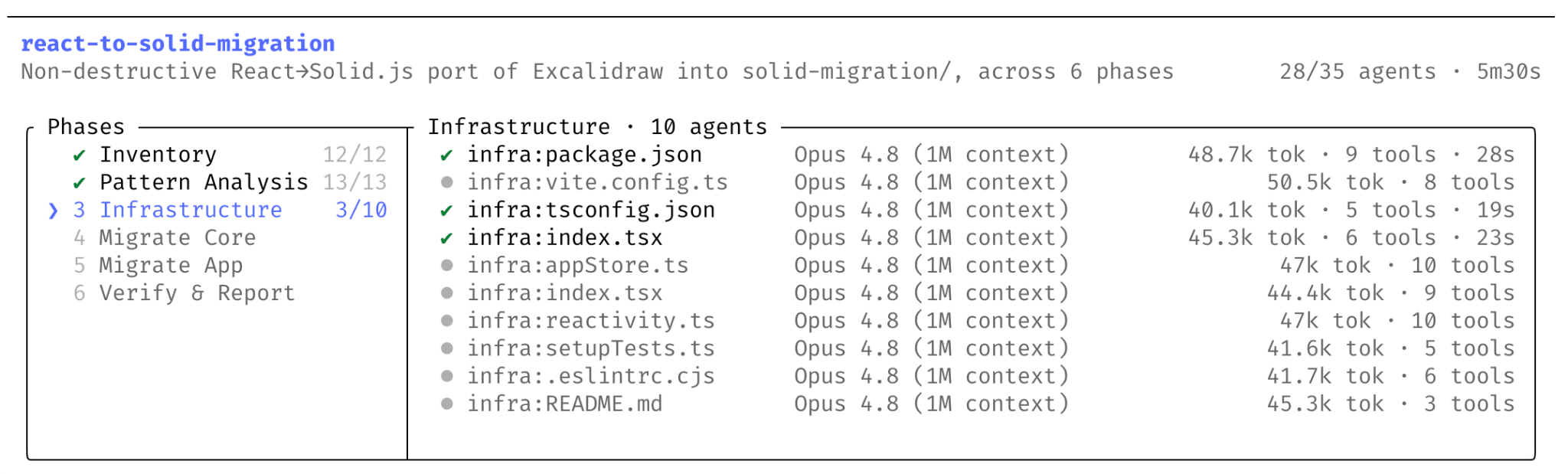
A workflow runs in the background, so you are never stuck watching a wall of text scroll by for twenty minutes. Type /workflows to open the run browser. It lists every workflow running or completed in the session, and pressing enter on one drills into its phases, then into a single stage, where you can see each agent that ran, the tool calls it made, and the tokens it spent. This visibility is exactly what the old "orchestrator living inside the model" approach could never give you.
A run stays interactive while it works. Press P to pause it and P again to resume. Press X to skip an agent that is stuck or no longer needed, or retry one you want to run again. Agents also retry themselves: if one fails, say because an MCP server dropped mid-call, Claude Code reattempts it up to three times before giving up, so a single flaky call does not sink the whole run.
Because the run lives in the background, you can keep working in the main session while it goes, or kick off a second workflow alongside the first. Several workflows run at once, each in its own set of isolated agents, none of them filling your main context window.
Workflows are resumable, which is what makes long runs safe. Each run has an ID, and a run can pick up from where it left off instead of starting over. Finish an eight-stage workflow and realize you want a ninth? You do not re-run the first eight. Add the stage and resume from the same run ID, and the completed stages replay from cache while only the new work executes. Re-running the same script with the same arguments replays the whole thing from cache, which is what makes a saved workflow cheap to reuse.
When Not to Use a Workflow
Workflows are powerful and expensive. They consume significantly more tokens than a normal Claude Code session, because you are paying for many agents instead of one. That cost is worth it for a fifty-file audit or a thousand-row ranking. It is wasteful for a two-line bug fix.
The honest test before reaching for a workflow: does this task really need more compute? Most traditional coding tasks do not need a panel of five reviewers. If a single agent can hold the whole task in one window without hitting the three failure modes, a single agent is the right tool. Workflows pay off precisely when the task is too big, too parallel, or too prone to self-grading for one context window to handle. For keeping any heavy run inside a sane token envelope, our usage optimization guide covers the patterns that matter.
Practical Tips
A few habits make workflows pleasant to live with day to day.
Reach for a quick workflow when the job is small. You do not need a hundred-agent fan-out to get a fast adversarial review of a single assumption. Ask for the quick version and Claude keeps it light.
Pair workflows with two commands. /loop makes a workflow recur on an interval, which is how you get continuous triage or a nightly audit. /goal sets a hard completion requirement, which fights agentic laziness by refusing to let the run declare victory early.
Set a token budget by prompting plainly: "use 10k tokens." That cap keeps an exploratory run from sprawling while you are still calibrating what a task costs.
When you build a workflow worth keeping, press "s" in the workflow menu to save it. Saved workflows land in ~/.claude/workflows, ready to reuse. To share one with your team, distribute it inside a skill: drop the JavaScript files in the skill folder, reference them in SKILL.md, and prompt Claude to treat them as templates rather than scripts to run verbatim. That way each reuse adapts to the specific task instead of replaying a fixed sequence, which is the whole point of a dynamic workflow.
Where This Fits
Dynamic workflows are the orchestration layer for everything multi-agent. They sit beneath the thread model we describe in thread-based engineering, where fan-out-and-synthesize is structured parallel threading with a barrier and loop-until-done is the long-running thread generalized. They are the on-demand cousin of Agent Teams, which you reach for when you already know the role decomposition and want a fixed, named roster instead of a harness written fresh each time. For a side-by-side of when to pick each, see Dynamic Workflows vs Agent Teams. And the always-on switch for them is ultracode, covered in depth in our ultracode guide.
The shift underneath all of this is that orchestration became a model decision instead of a developer decision. You used to write the harness. Now you write the success criteria, the constraints, and the trust boundaries, and Claude writes the harness to match. If you want a Claude Code setup where permission rules, hooks, and an agent framework are already tuned for that handoff, the ClaudeFast Code Kit ships those patterns preconfigured.
Last updated on